AI assist
Draft sections from a plain description, then review before anything sticks.
7-day trial. Card required. Cancel before day 7 and you are not charged.
Included on Starter and up.
Describe the job
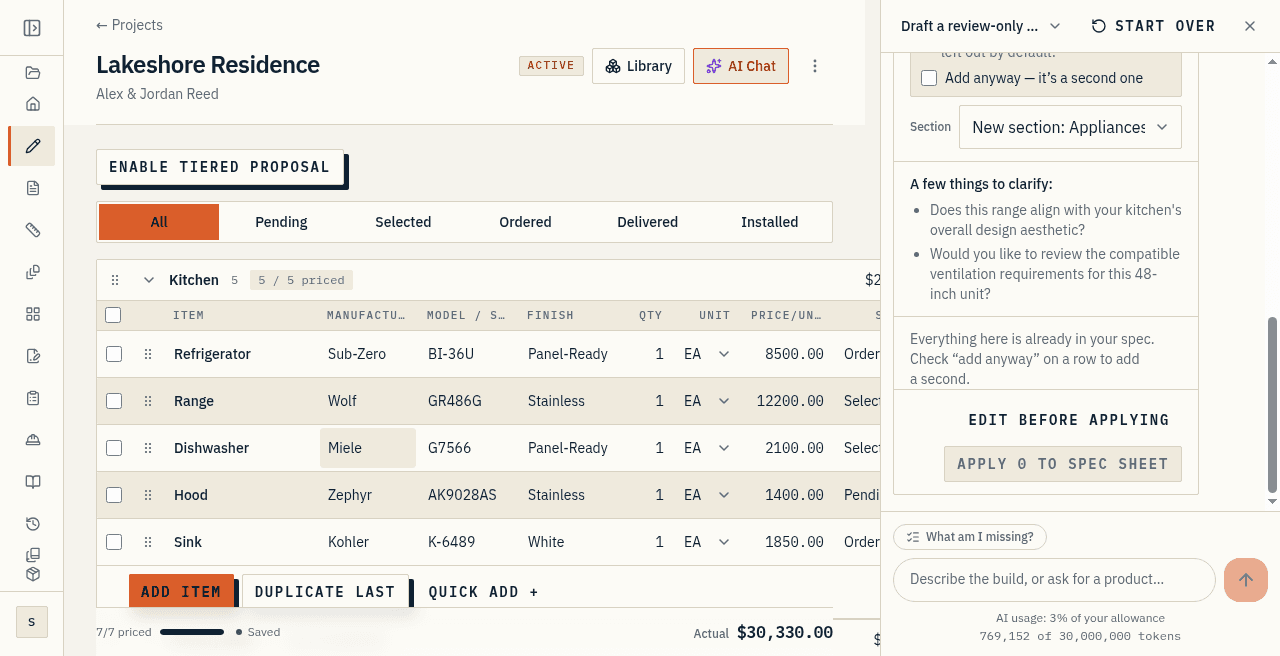
Inside a project, the AI workspace is a conversation next to your sheet. Ask it to add a section, expand a room, or name items a scope like yours usually forgets.
On New project, a quick-template can scaffold the whole job from a short description: bedroom count, kitchen finish, showers, basement or not.
Review, then confirm
Proposed changes arrive as a reviewable set. Nothing is written to the project until you accept it.
It fills structure and identity: sections, item names, sensible units, and typical manufacturers where a category has obvious ones.
It proposes per-line allowances only on unpriced placeholder items, so it never overwrites a real number you entered. It does not invent model numbers for products it cannot see.
Controls you can see
AI behaviour lives under Settings, on the AI tab. That is where you turn assist off if you would rather work without it.
Drafting draws from the shared monthly AI allowance on your plan. Settings shows current usage.
Not Takeoff AI
This is the chat builder and the quick-template. It is not Takeoff AI.
Takeoff AI is not live. AI assist does not read a plan set, propose rooms from a sheet, or draft quantities off the drawings.
At a glance
- Describe the job in plain words; the chat builder drafts sections you can edit.
- Every draft is review-then-confirm. Nothing is added until you say so.
- Quick-templates set up a whole project in one shot.