Client collaboration
Clients leave comments and approve on the share link. You get notified. The decision stays on the finish schedule instead of in a buried email thread.
7-day trial. Card required. Cancel before day 7 and you are not charged.
Included on Pro and up.
What collaboration is for
The two things a client actually needs to do on a finish schedule are ask about a line and say yes. Both happen on the share link. The question sits on the faucet row. The approval records a name, a date, and the tier they were looking at. You get an email when something lands, so you are not polling the page.
Included on Pro and up, on every plan that includes sharing. Comments and approvals only exist where sharing is enabled.
Comments
A client can comment on an individual item or on a whole section, not just on the document. No login. No account to create. Every comment is timestamped and attributed to the name they typed. You can mark it resolved once it is handled. The record stays on the project.
The same question in an email thread is a question you have to go find. On the sheet it stays attached to the row you will order against.
Approve with a name and a date
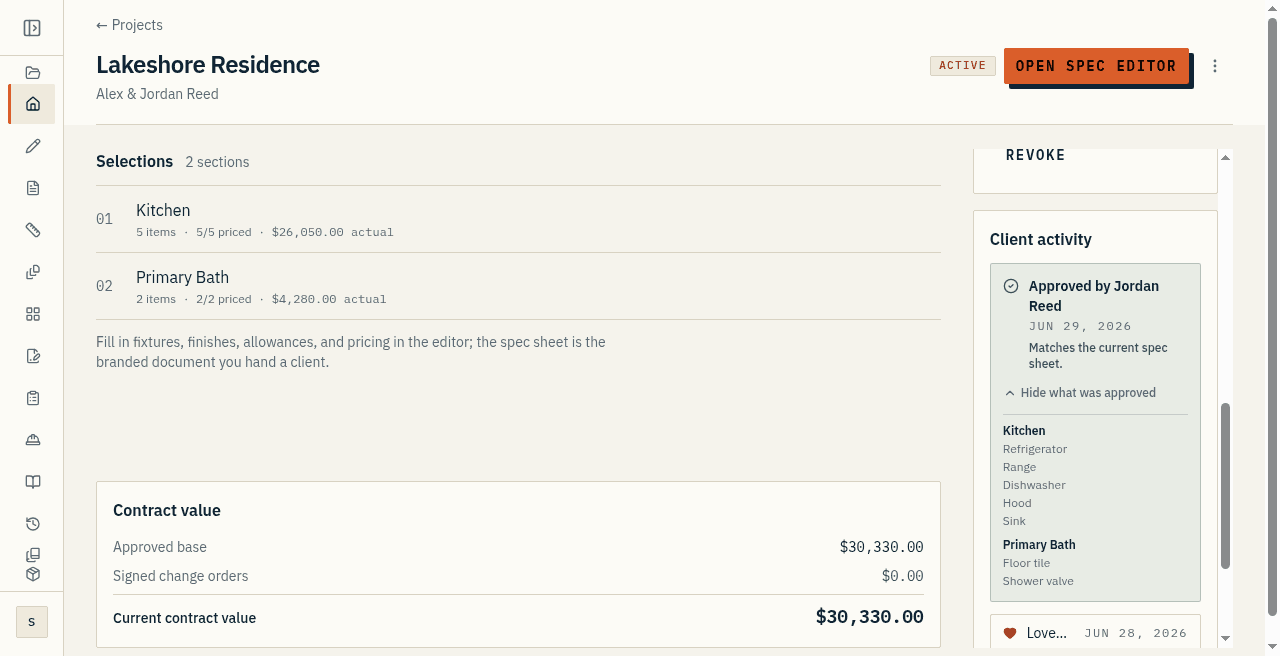
Approving asks the client for their typed name, then records the date and the exact tier they were viewing. The snapshot is what they agreed to: every item and every field shown to them. This is a documented acknowledgment, not an electronic signature.
When you need a legally weightier instrument with intent and consent captured, that is a change order. Browsing a tier on the link does not select it. The approval is the decision on the record.
Activity after approval
A project activity feed collects comments and approvals. If the sheet changes after it was approved, the project can flag that drift. Treat that flag as soft until you have looked at the snapshot versus the live sheet.
That indicator is the thing to look at before a trade orders anything. This page does not claim a full project-management inbox. It is the client activity on this job, newest first.
What this is not
This is not an electronic signature. It is not a project chat that lives off the sheet. It is not a client login, and it is not a substitute for a signed change order when the money or the scope moved.
Disable the share link and the public surface goes away, comments included. The records already taken are kept. Cost and markup stay off the link.
At a glance
- Clients comment on a line or a section of the share link. No account to create.
- Every comment emails you. Mark it resolved when it is handled. The record stays on the project.
- Approval records a typed name, the date, and the tier they were viewing.
- This is a documented acknowledgment, not an electronic signature and not a project chat off the sheet.